


OnePay – Mobile Banking
4.822.82K Reviews
App Specs
- Version
- 5.80.0
- Updated On
- License
- Free
- Downloads
- 5,000,000+
- Developer
- ONE Finance, Inc.
- Categories
- Finance
- Platform
- Android, iOS
Screenshots
 Analysis by AppCompare
When I judge a mobile banking app, convenience is only half the story. I also want to know what I can control, when I’m being asked to share sensitive information, and whether the app’s role in my finances is clear. OnePay – Mobile Banking brings payments, banking and credit-building together, which makes it appealing if you prefer to manage everyday money from your phone. I’d still approach it as a financial tool rather than a magic shortcut: it can make routine tasks easier, but it’s worth taking time to understand each step before moving money or sharing personal details.
Trust starts with understanding the service
OnePay is a free finance app from ONE Finance, Inc. It has a 4.8 average from around 116,000 ratings, and more than 5 million installs. Those figures suggest that many people have tried it, but popularity alone doesn’t tell me whether an account or app fits someone’s needs. I’d use them as background, then focus on the practical questions: what tasks I expect to do, what information I’m comfortable entering, and what account options are presented during setup.
The app is rated for Everyone, and its current version is 5.45.0. It first appeared on July 23, 2020, and the listed minimum operating system is 7.1. The developer’s name is useful context, but it isn’t a substitute for reading the on-screen terms and choices yourself. In finance, I think trust comes from being able to make an informed decision at each stage, not simply from a familiar-looking interface.
Use the controls you can see
Before relying on any banking app for regular bills, I’d take a little time to explore its account screens and available settings. Check where balances and transactions appear, how a payment is reviewed before submission, and what options are shown for managing access to the account. Those small checks matter more than a polished home screen when you’re deciding whether the app suits your routine.
I’m especially careful with recurring payments. If you choose to set one up, note the amount, timing and destination before confirming, then make a point of checking it again later. A reminder can help you remember that a payment is coming, but it shouldn’t replace checking that the details are still right. That’s a useful habit with any banking service, and it helps prevent a convenient automation from becoming something you forget to monitor.
Pause at sensitive moments
Getting started with a financial app can involve identity checks and personal account information. I treat those screens differently from ordinary profile setup: I slow down, read what’s being requested, and make sure I’m inside the official app before entering anything sensitive. If a prompt is unclear, I’d rather pause and find an explanation than tap through just to reach the home screen faster.
Payments deserve the same attention. Before sending money or paying a bill, I’d verify the recipient and amount, especially when using details I haven’t used before. If you’re trying a new app, a sensible approach is to begin with a low-stakes task you already understand, then review the resulting activity. That gives you a chance to learn where confirmations and transaction records appear before you depend on the app for something time-critical.
Worth Reading Before You Choose

EA SPORTS FC Mobile 26 Is a Bigger Football Game, but It Takes Time

Flipboard Shows What News Apps Must Do Beyond the Feed

Switching to Android Auto Means Rethinking Your Driving Routine

Google Calendar Makes a Crowded Week Easier to Manage

Ludo King Makes the Most of the Minutes Between Plans

Baby Panda World Brings Quick Play to Modern Phones, but Its Game Library Feels Busy
Getting Started with OnePay
First things first, downloading and setting up OnePay – Mobile Banking is a breeze. Available for both Android and iOS, this app is designed to be user-friendly right from the get-go. Once you download it, setting up your account is as easy as pie. I simply entered my credentials, verified my identity, and boom, I was in.
Features That Stand Out
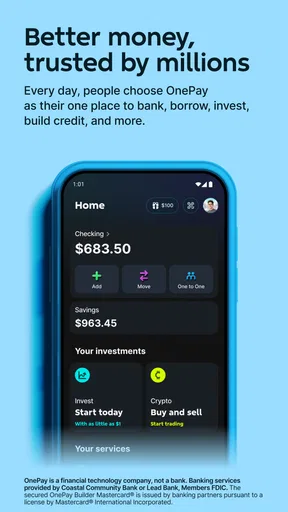
What really caught my eye were the features. The app offers a comprehensive suite of banking services: checking your balance, transferring funds, paying bills, and even setting up automatic payments. It’s all there at your fingertips. And trust me, having everything in one place is a real game-changer. No more hopping from app to app just to manage your finances.
The real kicker? OnePay also offers a budgeting tool. I’ve always struggled with keeping my expenses in check, but this feature makes it so much easier to track spending habits and set financial goals. Plus, the app sends reminders and alerts to keep you in the loop. It’s like having a personal financial advisor, minus the hefty fees.
User Experience and Interface
One thing I absolutely love about this app is its sleek and modern design. The interface is intuitive and easy to navigate. Whether you’re a tech wizard or someone who struggles with smartphones, you’ll find this app a breeze to use. The color scheme is easy on the eyes, and the layout is logical and uncluttered.
Security-wise, OnePay takes the cake. With two-factor authentication and biometric login options, I felt secure knowing my financial data was well-protected. It’s like having a high-tech vault in your pocket.
Choosing it for the right job
I see the strongest case for using OnePay as a daily money hub if you want routine banking, bill payments and a view of your spending in one place. Imagine checking your balance before buying groceries, paying a household bill during a lunch break, then reviewing the week’s purchases when you have a quiet moment. That workflow can be simpler than opening a bank app for balances, a separate budgeting tool for expenses and another service for reminders.
There is a trade-off, though. Putting several money tasks in one app makes everyday administration less scattered, but it also means you should be comfortable with that app becoming a regular part of your financial routine. If you prefer to keep budgeting separate from banking, or you already have a setup that works well, switching everything just for the sake of consolidation may not be worthwhile. I’d start with the task you most want to simplify and see whether the app earns a broader role.
Make budgeting useful, not just visible
A budgeting tool helps most when I give it a specific job. Rather than opening it only when I’m worried about spending, I’d use a regular check-in to compare recent activity with a practical goal, such as keeping food purchases within a comfortable range or setting aside money for an upcoming expense. The point is not to treat every category as a strict rule; it’s to notice patterns early enough to make a choice.
One useful habit is to check the budget before a predictable high-spend period, then review it afterward. For example, if a weekend includes errands and a meal out, looking at the available picture beforehand can help me decide what feels reasonable. Checking again later turns the tool into feedback rather than a source of guilt. Alerts can prompt a review, but I wouldn’t assume an alert understands the reason behind a purchase or can make the decision for me.
Where it differs from familiar alternatives
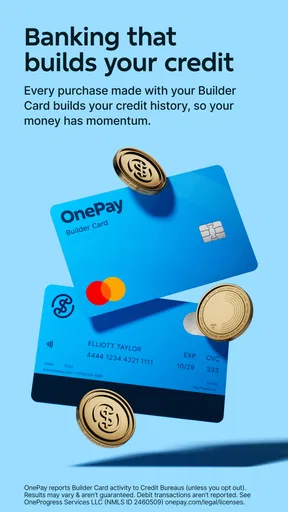
Compared with a traditional bank’s app, OnePay’s appeal is the combination of banking tasks with budgeting and credit-building in the same finance-focused experience. A bank app may be the more comfortable choice if your priority is staying within an existing banking relationship and using the tools you already know. A standalone budgeting app may suit someone who wants to organize spending across a broader set of accounts or prefers to keep financial planning distinct from payments.
I wouldn’t choose between them based on the word “all-in-one” alone. Think about which screen you open most often and what you need to do there. If you mainly want to review a budget, a dedicated tracker may feel more purpose-built; if you mostly need a convenient place for everyday banking actions, OnePay’s mix may be a better fit. And if you’re considering it for credit-building, take time to understand the specific terms and steps presented in the app rather than assuming that using the app by itself will produce a particular result.
Small habits that prevent avoidable mistakes
For the first stretch of use, I’d avoid moving every routine payment over at once. Keep a note of which bills you’ve arranged through the app, confirm each one after setup, and check your activity around the expected payment date. That simple transition plan makes it easier to spot a missed or duplicated arrangement while you’re still learning where the relevant information appears.
I’d also make a distinction between a notification and a record. A reminder is useful for drawing attention to an event, but when I need to know whether money actually moved, I look for the transaction information in the account rather than relying on a phone alert. This is a small but important workflow difference: notifications can be dismissed or overlooked, while checking the activity itself helps me make decisions from the account’s displayed history.
Access is another practical consideration. The app supports biometric login options and two-factor authentication, which gives users security-related choices to consider. I’d choose a sign-in method that balances convenience with how I use my phone, and I wouldn’t share device access casually if the app is part of my banking routine. Those controls can improve the sign-in process, but they don’t remove the need to keep the device and account details private.
Who may want to look elsewhere
OnePay is less compelling for someone who wants a desktop-first way to manage money, dislikes handling account tasks on a phone, or needs a budgeting workflow that is highly customized. It may also be a poor match if you’re unwilling to review payment details and account prompts yourself. A convenient interface can reduce friction, but financial decisions still need attention, especially around recurring payments, identity checks and credit-related steps.
If you already have a bank and budgeting system that you understand and trust, compare the actual tasks before changing habits. The best alternative may be the one that makes your current routine clearer, not the one with the most features in one place. I’d also avoid treating a high user rating as proof that every account situation or personal preference will be covered. Different people need different levels of budgeting detail, payment flexibility and separation between services.
What I would check before depending on it
A common question is whether someone can use it only for one feature. I’d approach that by looking at the account setup and the available screens directly, then deciding whether the required steps make sense for the particular task. The app brings together several finance activities, but the right starting point depends on what you’re trying to do and what choices are shown to you.
Another practical question is whether it can replace a current bank or budgeting app. I wouldn’t make that decision in one sitting. First, identify the services you actually use; then compare how you handle balances, transfers, bills, budgeting and any credit-building steps. If an important task or account arrangement isn’t clear in the app, keep your existing method until you have a confident answer. A gradual test is safer and more informative than moving everything at once.
People also ask whether alerts can keep them on top of every financial change. I see reminders as prompts, not guarantees. They can make a routine easier to remember, but it’s still sensible to check account activity and payment details yourself. Similarly, an in-app budgeting view can help you reflect on spending, but your own context matters: an unusual purchase may be planned, and a quiet week may not represent your usual pattern.
Final Thoughts
In a world where convenience is king, OnePay – Mobile Banking is a must-have app for anyone looking to streamline their financial life. The ease of use, robust features, and top-notch security make it a standout choice for mobile banking. Whether you're managing a small budget or juggling multiple accounts, this app has got you covered.
So, if you’re tired of dealing with clunky banking systems and want something that truly meets your needs, give OnePay a try. It might just change the way you handle your finances. Now, if only everything in life could be this simple!
A measured recommendation
My recommendation is to treat OnePay as a promising option for phone-based everyday money management, not as an automatic replacement for every financial tool you already use. Its combination of banking tasks, budgeting and credit-building gives it a clear reason to consider, and its 4.8 average reflects a strong response from many users. I would still let your own needs decide: test the workflows that matter, pay attention to the choices presented at sensitive moments, and keep a familiar backup routine until you’re confident.
For me, the most useful question is not whether one app can do everything, but whether it makes the things I do often easier without making me less attentive. If you value a single mobile place to handle routine tasks and are willing to review your account activity yourself, it’s worth exploring. If your priority is a particular banking relationship, detailed budgeting controls, or a desktop-based process, compare those needs carefully before making the switch.
Pros
- User-friendly interface enhances navigation.
- Quick transaction processing times.
- Wide range of supported payment options.
- Secure authentication methods ensure safety.
- 24/7 customer support available.
Cons
- Limited features in the free version.
- Occasional login issues reported.
- Doesn't support all banks yet.
- Requires stable internet connection.
- No dark mode for night use.
FAQs for OnePay – Mobile Banking
What features does OnePay – Mobile Banking offer?
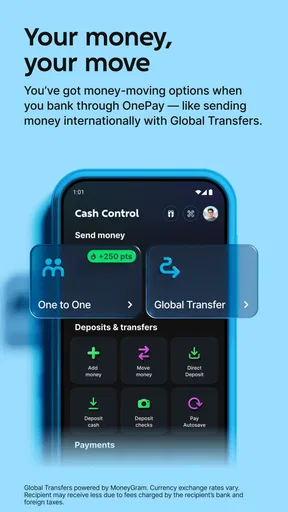
OnePay provides a comprehensive suite of banking features, including balance inquiries, fund transfers, bill payments, and mobile check deposits. Users can also manage their cards, set up notifications for transactions, and access a financial dashboard for tracking expenses. The app supports biometric login for enhanced security.
Is OnePay – Mobile Banking secure to use?
Yes, OnePay employs advanced security measures to protect user data. It includes multi-factor authentication, biometric login options such as fingerprint and facial recognition, and end-to-end encryption. Regular updates ensure that the app remains protected against the latest security threats.
Can I use OnePay – Mobile Banking internationally?
OnePay supports international transactions, allowing users to send and receive money worldwide. However, fees may apply for certain services, and exchange rates are subject to change. It's advisable to check the app's terms and conditions or contact customer service for specific queries about international usage.
Does OnePay – Mobile Banking charge any fees?
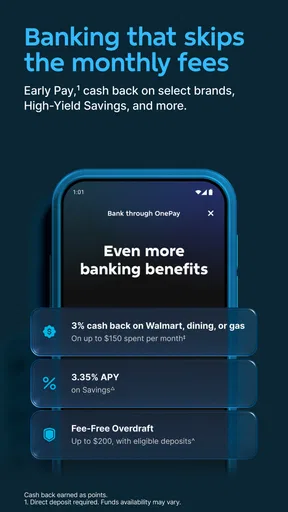
OnePay is generally free to download and use for standard banking transactions. However, there might be fees for premium services such as international transfers, expedited payments, or stop payment requests. Users should review the app's fee schedule for detailed information on any charges that may apply.
How user-friendly is the OnePay – Mobile Banking app?
The OnePay app is designed with user experience in mind, offering a clean and intuitive interface. New users will find it easy to navigate through various features, while experienced users can take advantage of customizable options. In-app tutorials and a responsive customer support team further enhance usability.


